
Whistleblowing product update: run your internal complaints investigation in one place


This release brings the full investigation lifecycle into the case itself. Handlers can triage by risk, work a task checklist, and keep private notes and evidence alongside the disclosure. Admins get the settings to standardise all of that, plus a new Analytics dashboard for board and committee reporting. Everything below is live now. The update is organised in two parts: what changes for handlers working cases, and what changes for admins who configure the platform and report on it. Admins should read the three setup steps at the end first, since two of them affect what your reporting shows.
For handlers: everything on the case
The day-to-day case view now carries the tools an investigation actually needs. The case is tabbed into Messages, Notes & Attachments and Activity, and the detail view gains risk, tasks and outcomes.
Triage by risk level
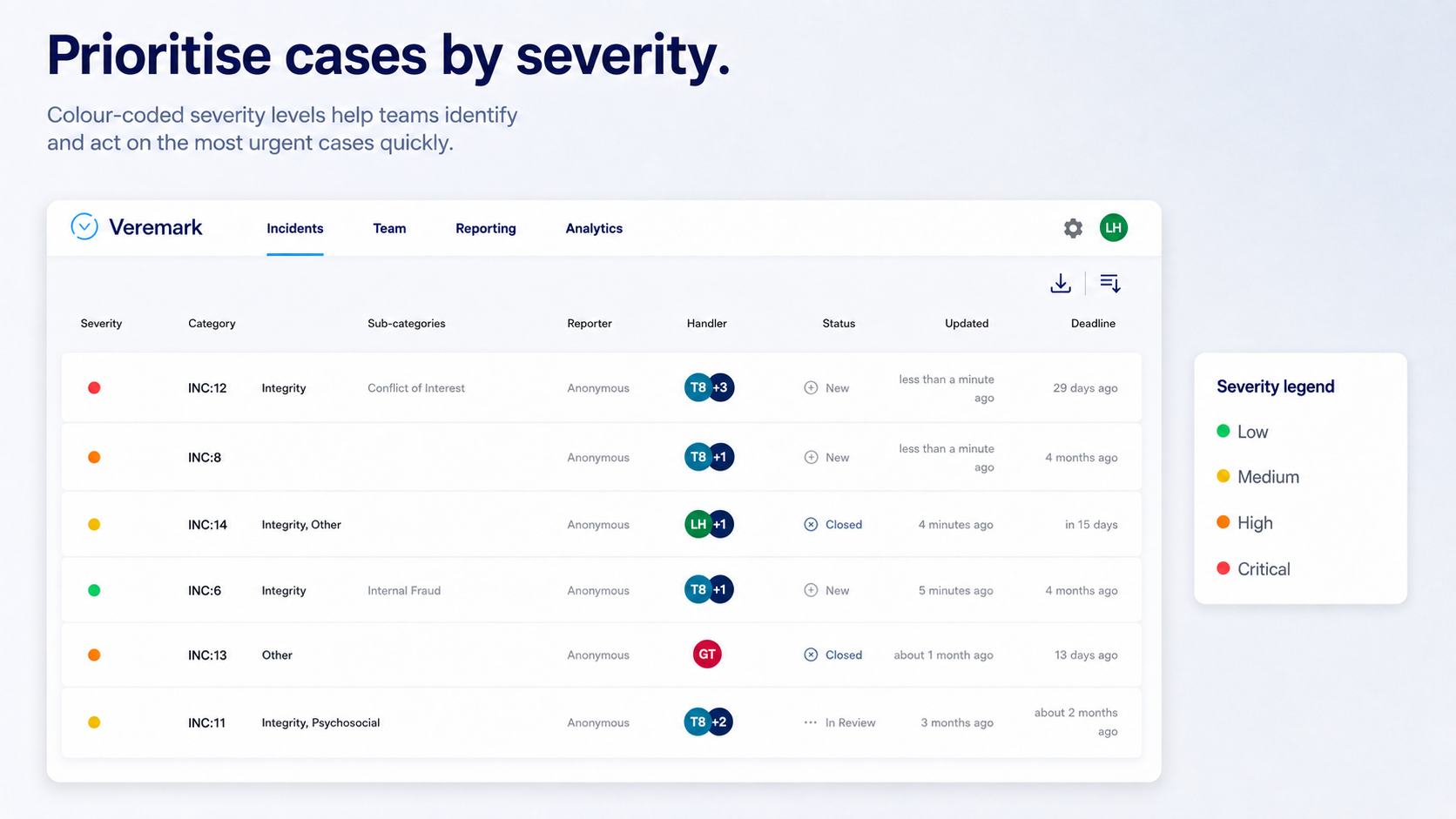
Every case now carries a risk level, so a handler can see at a glance what needs attention first. An imminent threat and a minor civility complaint used to look identical in the case list.
There are four levels: Low, Medium, High and Critical. New and existing cases start at Medium until someone triages them. A colour-coded selector on the case detail view (green, yellow, orange, red) lets any handler change the level at any point in the case, and a coloured dot on every row of the case list means you can scan a whole list for risk without opening anything.
Risk level is an internal triage tool and is never shown to the discloser. It is visible in Analytics through the Severity Breakdown, but it is not yet a filter you can apply to the dashboard or the case list. Risk scoring matrices, auto-assignment, escalation notifications and per-severity SLA tracking are not part of this release.
Work the investigation as a checklist
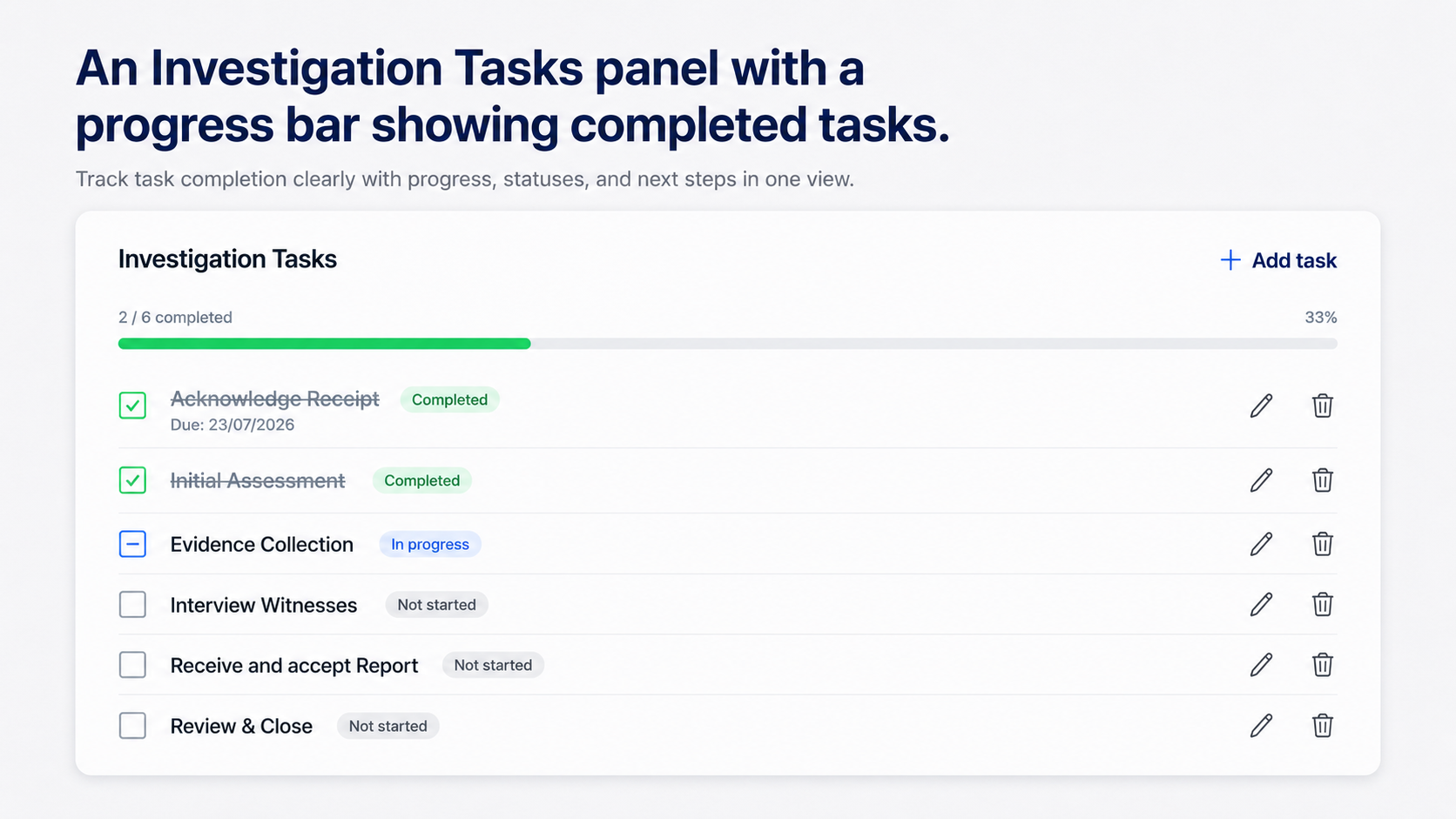
Each case now has an Investigation Tasks panel with a progress bar showing completed tasks out of the total, so a case has a visible plan and anyone picking it up can see how far along it is. Until now these steps lived in handlers' heads or in external tools.
Click a task's status icon to cycle it through Not started, In progress and Completed, and completed tasks are struck through. Each task can carry an optional description, an assignee from your team and a due date. Anything past its due date and not yet complete is flagged with an amber overdue warning. Tasks can be added, edited and deleted from the panel, task descriptions are encrypted with the same protection as case messages, and every add, status change, edit and delete is written to the case Activity log, for example Task "Evidence Collection" marked Completed.
The checklist is built from a library your admins manage, so the tasks you see reflect your company's standard process. Free-text ad hoc tasks are not supported yet, tasks cannot be reordered on an individual case yet, and no email notifications are sent for assignment or completion.
Record how the case closed
Once a case moves to a closing status, an outcome selector appears alongside the status. Recording an outcome is optional, so a case can still close without one. Only active outcomes are offered, though if a case already holds an outcome that has since been deactivated, that value still shows rather than silently disappearing. The outcome is included in the incident export. Once recorded, an outcome can be changed but not cleared back to empty.
Keep private notes and attachments
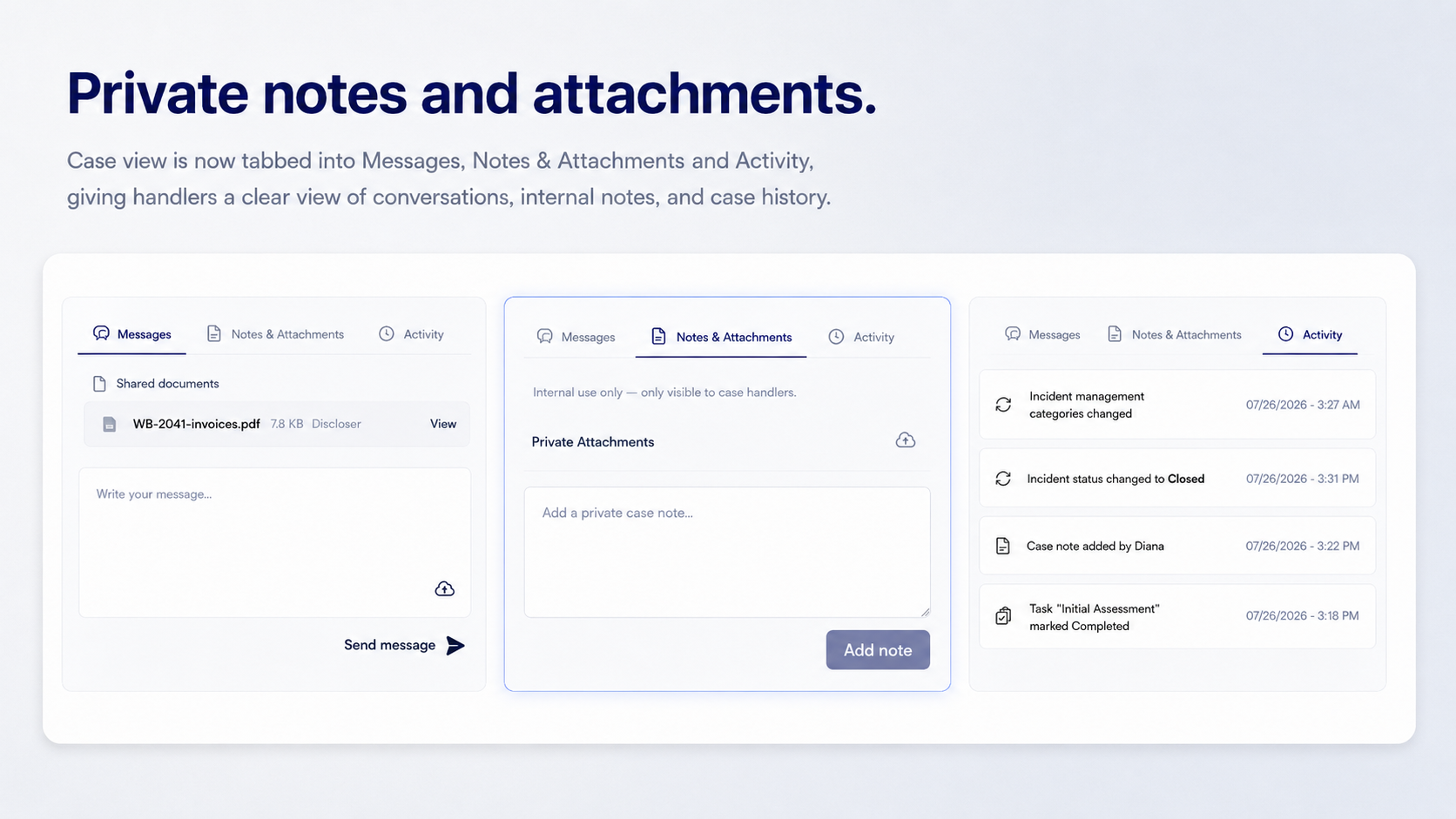
Handlers can now record observations, analysis and decisions that should not reach the discloser, and attach their own evidence, all on the case. Both used to end up in email or a shared drive, which fragmented the record and made handovers difficult.
Private notes are plain text with author and timestamp, newest first, and authors can delete their own with a confirmation step. Private attachments upload by drag-and-drop or browse, up to 25MB per file, preview in the built-in viewer, and can be deleted by whoever uploaded them. Both are strictly internal, kept separate from the documents in the Messages thread, and never exposed to the discloser. They are encrypted in the browser with the case passphrase, the same protection applied to case messages and discloser files, so the server never sees their contents. Adding or deleting either is recorded in the Activity tab.
Notes cannot be edited after posting, so delete and repost to change one. They are plain text, with no rich-text or markdown formatting, and no email notifications are sent for notes or handler attachments.
For admins and leadership: setup and reporting
Admins get the settings that standardise how every handler works, plus a company-level view of performance.
Build the investigation checklist
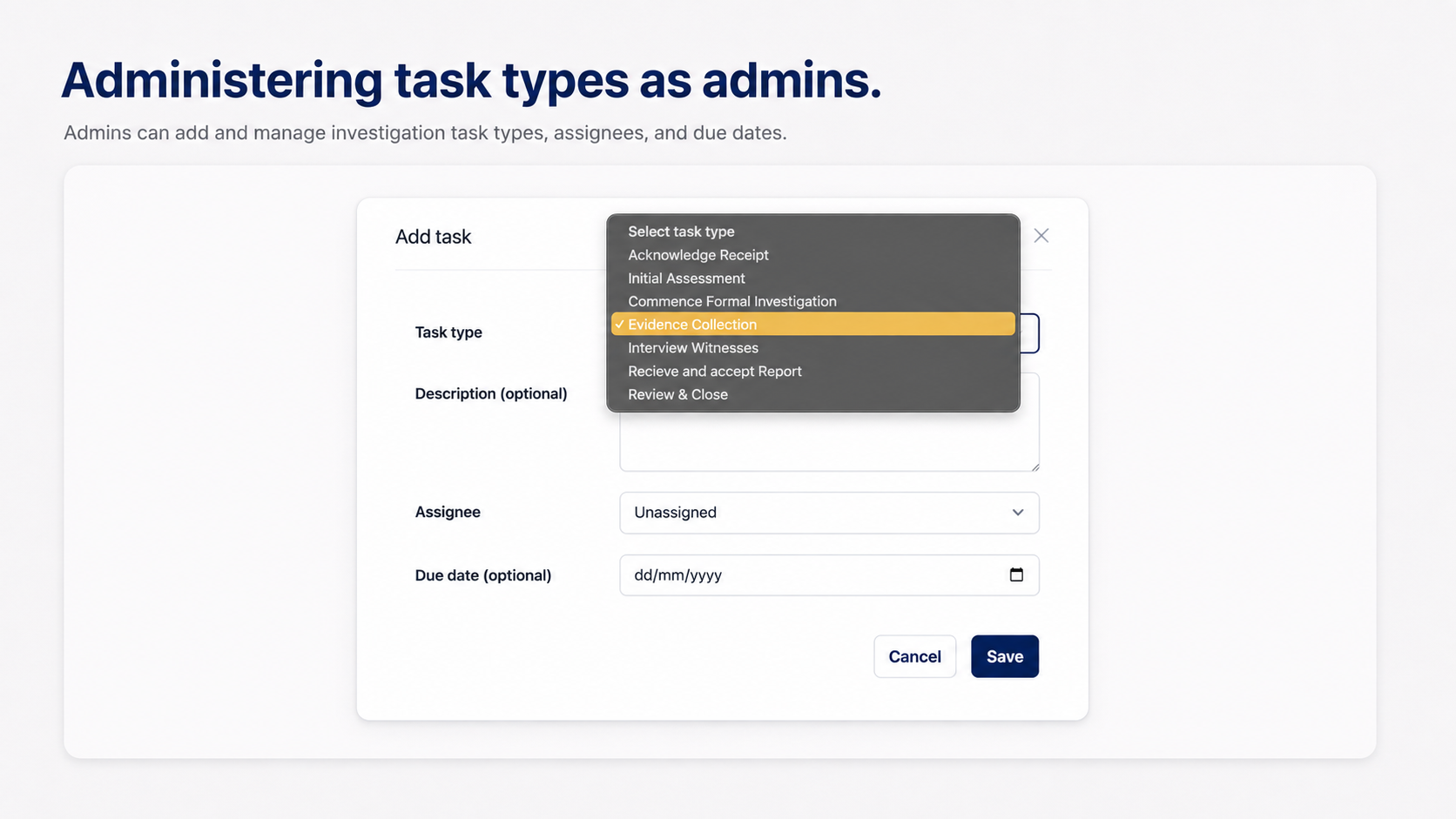
Settings > Investigation Task Types is the library the case checklists are built from. Add, rename and reorder types, and note that removing one deactivates it rather than destroying history, so tasks already created against it stay intact on their cases. The order you set is the order tasks appear in on a case. Mark a type as auto-added and it lands on every new case automatically, which gives every case a consistent starting checklist; types that are not flagged stay available to add by hand. Task type names must be unique within your company, and changes apply to cases created from that point on rather than retroactively.
Every company has been seeded with six auto-added types: Acknowledge Receipt, Initial Assessment, Evidence Collection, Interview Witnesses, Prepare Report, and Review & Close. Companies that already had task types were left untouched.
Configure closure outcomes
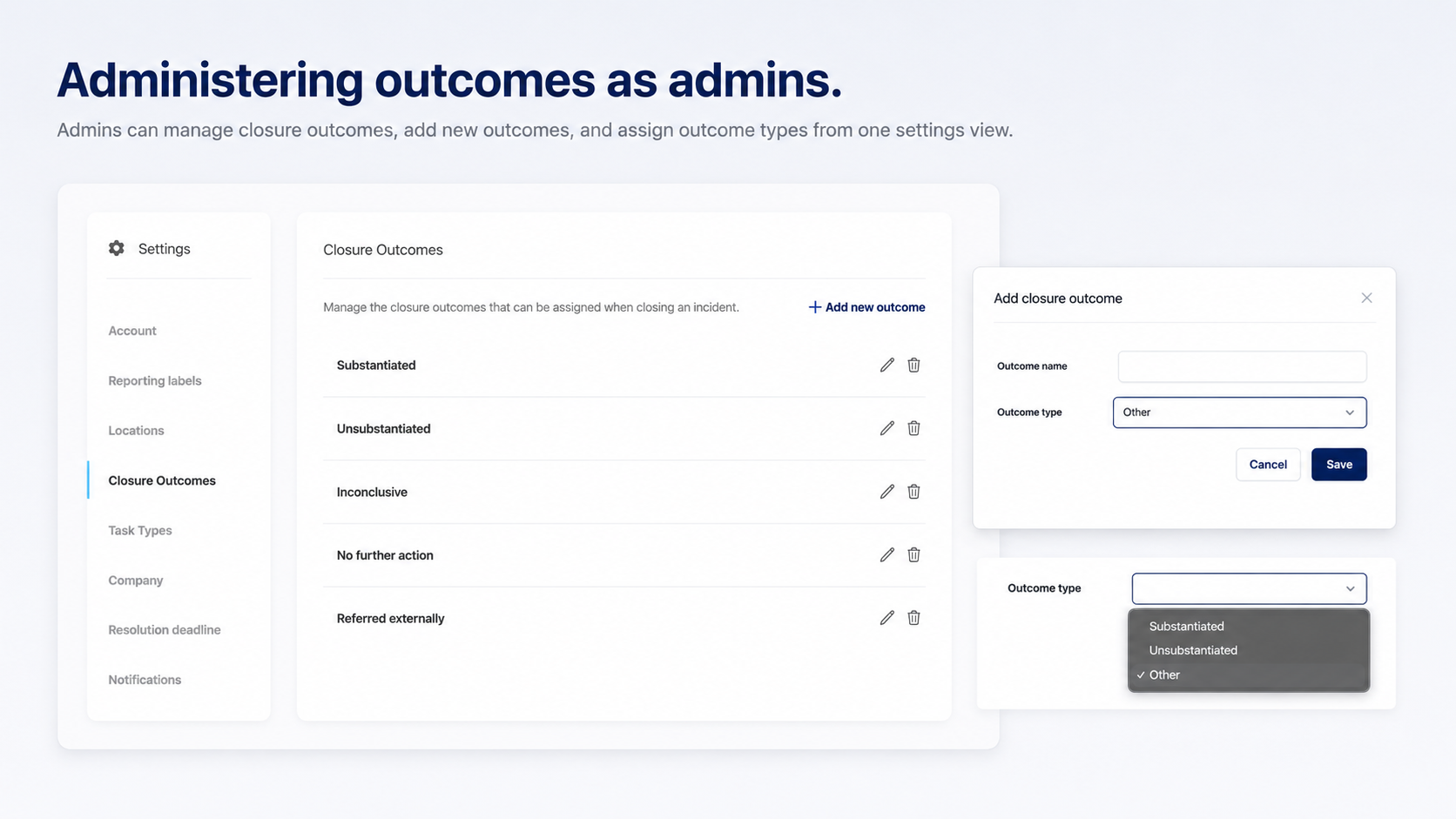
Settings > Outcomes, visible to admins only, is where you define how cases can close. Add, rename and remove outcomes, with removal deactivating rather than deleting so closed cases keep their history. Outcome names must be unique within your company.
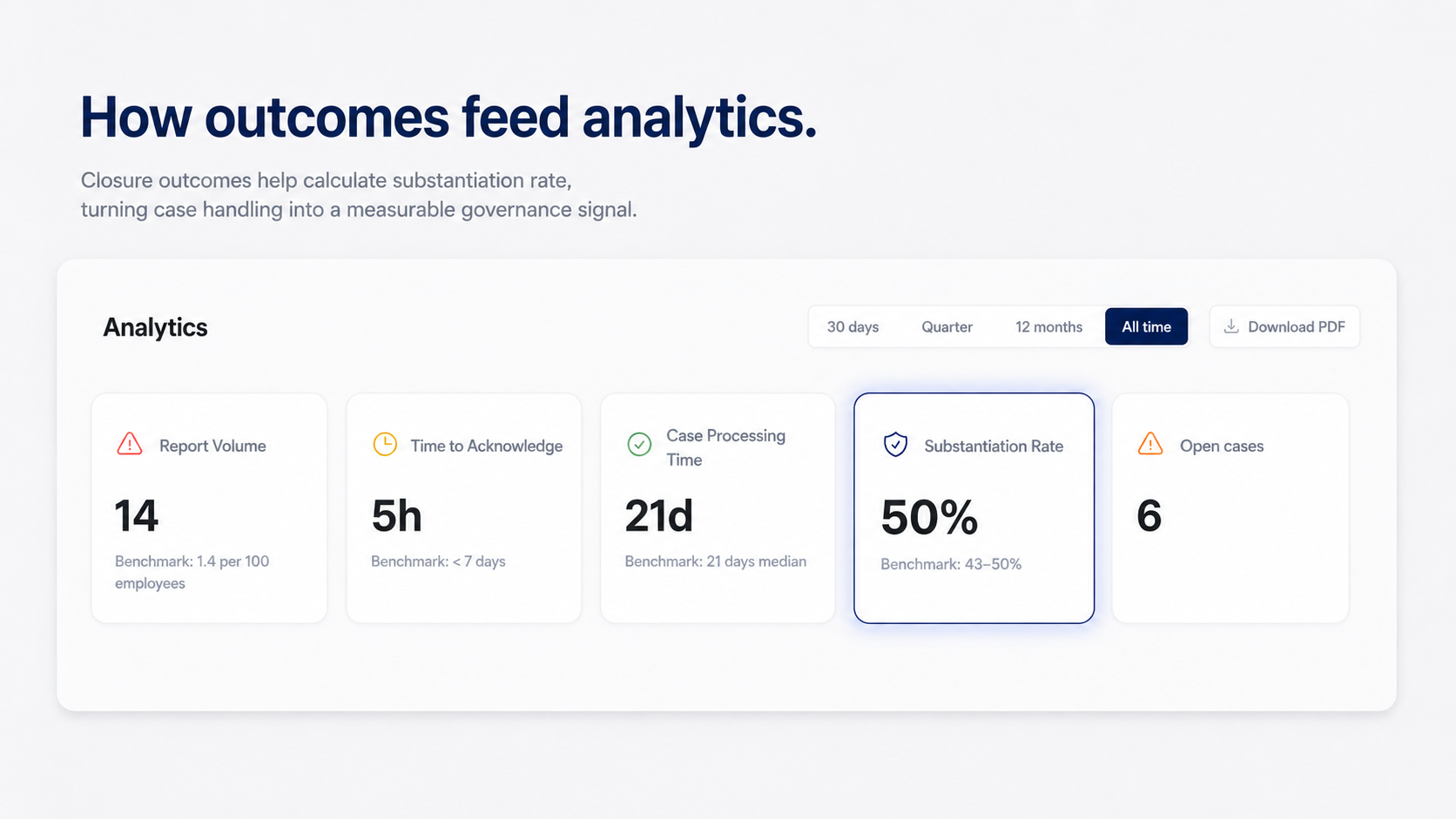
Each outcome has a type: Substantiated, Unsubstantiated or Other. You word the name however suits your policy, and the type is what reporting keys off, so several differently named outcomes can all count as substantiated. Substantiation Rate on the dashboard is the share of closed cases whose outcome is typed Substantiated, so an outcome left on Other never counts towards it. Deactivated outcomes are hidden from the settings list, so reactivating one is not possible from the UI yet.
Companies with no outcomes configured were given five: Substantiated, Unsubstantiated, Inconclusive, Referred externally and No further action. All of them carry the type Other and need their types set before the Substantiation Rate KPI is meaningful.
Report from the Analytics dashboard
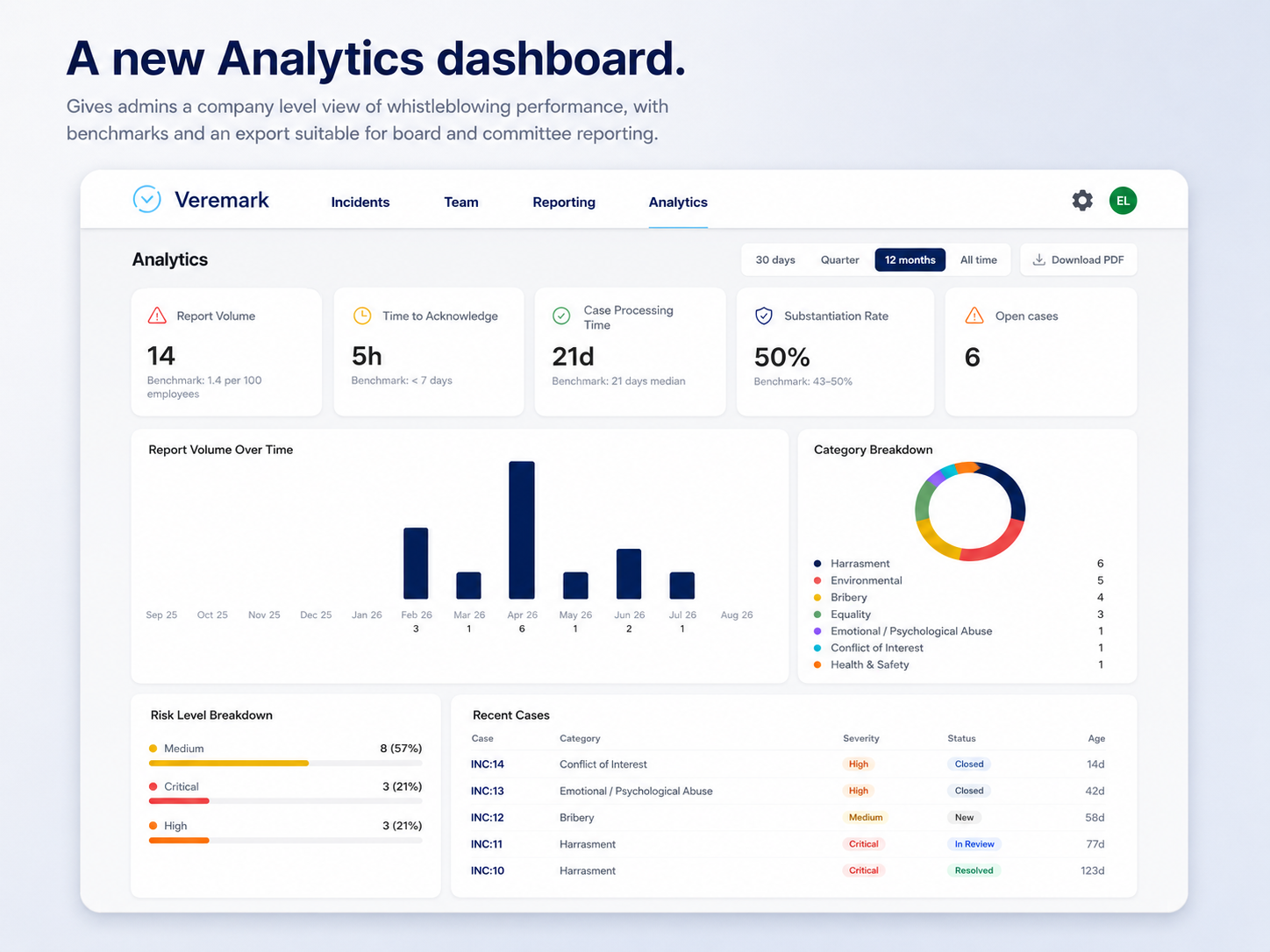
Analytics appears in the main navigation for admin users only; handlers and reviewers do not see it, and the underlying endpoint is admin-restricted. A segmented control offers 30 days, Quarter, 12 months (the default) and All time, and everything on the page respects the selected range.
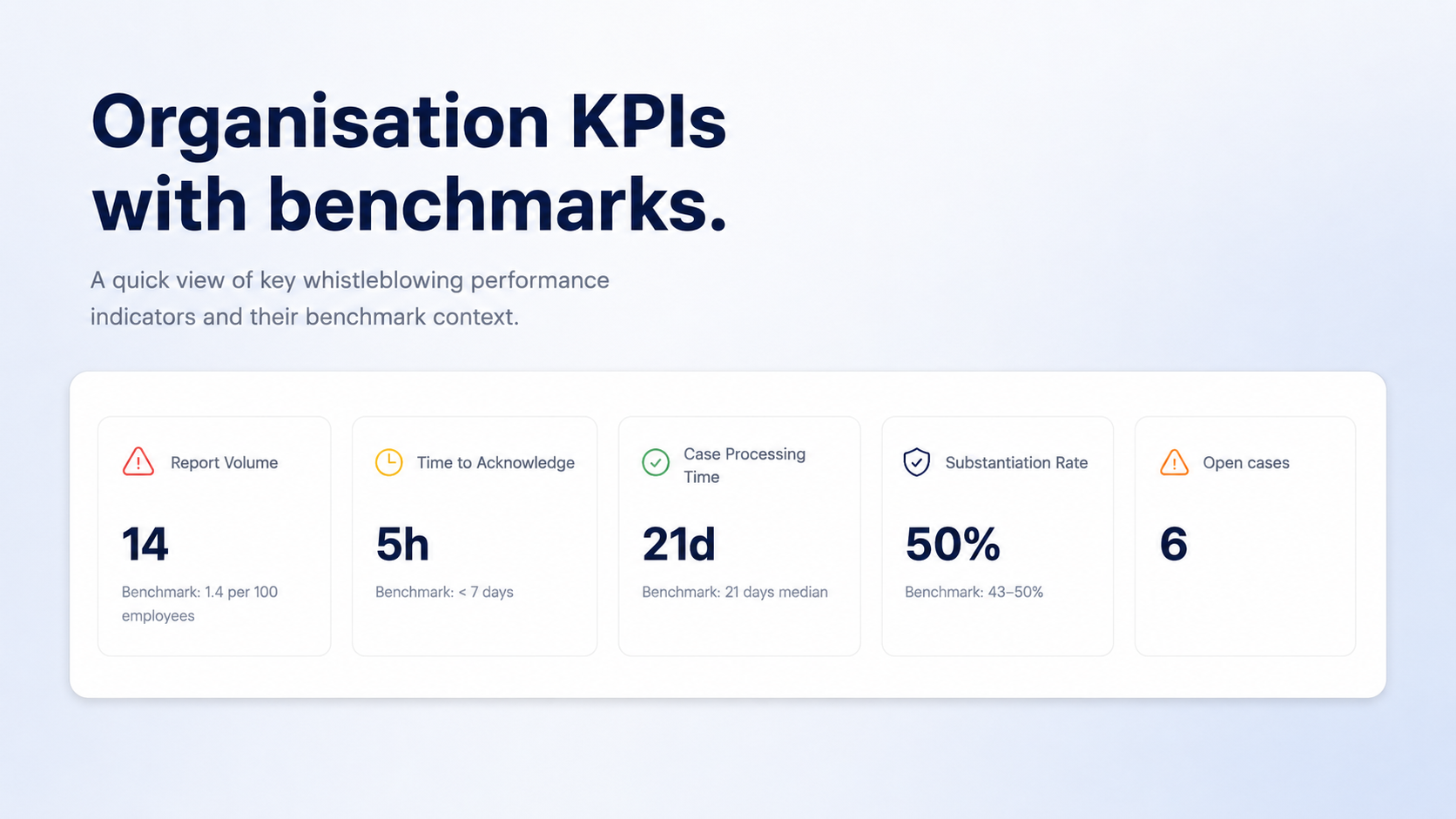
Five KPIs each show a benchmark:
- Report Volume: cases created in the range, against 1.4 per 100 employees.
- Time to Acknowledge: average hours from report to first company reply, against under 7 days.
- Case Processing Time: median days from creation to close, against 21 days.
- Substantiation Rate: substantiated closed cases as a share of all closed cases, against 43 to 50%.
- Open cases: cases not in a completed or declined status.
Where there is not enough data to calculate a figure, the card shows a dash rather than a misleading zero. Below the KPIs sit a 12-month Report Volume bar chart, a Category Breakdown donut with a counted legend, a Severity Breakdown by risk level, and a Recent Cases table with case number, category, severity, status and age, each linking through to the case.
A Download PDF button prints the page as A4 landscape, with the navigation and filter controls hidden and a header showing the company name, the reporting period and the generation date. That landscape setting applies to the analytics page only. Every figure is derived from unencrypted case metadata such as statuses, outcomes, categories and timestamps. No encrypted case content is read to produce it, so the end-to-end encryption model is unchanged. The dashboard is fully translated in English and other languages.
Three setup steps after upgrading
- Set your outcome types. Every existing outcome was created as Other. Until you set the correct type on your substantiated outcomes at Settings > Outcomes, the Substantiation Rate KPI reports 0%. Renaming is not enough; the type is the field reporting uses.
- Review your task types. Six defaults have been created. Decide which auto-add to new cases, adjust the order, and add any of your own.
- Triage severity on live cases. Every existing case defaults to Medium, so set the real risk level on your open cases.
A documented risk assessment and reportable outcomes also support the assessment requirement in ISO 37002 section 8.3 and the risk-based triage expected in government procurement. If you would like a walkthrough for your team, speak to your customer success manager.



FAQs

This depends on the industry and type of role you are recruiting for. To determine whether you need reference checks, identity checks, bankruptcy checks, civil background checks, credit checks for employment or any of the other background checks we offer, chat to our team of dedicated account managers.
Many industries have compliance-related employment check requirements. And even if your industry doesn’t, remember that your staff have access to assets and data that must be protected. When you employ a new staff member you need to be certain that they have the best interests of your business at heart. Carrying out comprehensive background checking helps mitigate risk and ensures a safer hiring decision.
Again, this depends on the type of checks you need. Simple identity checks can be carried out in as little as a few hours but a worldwide criminal background check for instance might take several weeks. A simple pre-employment check package takes around a week. Our account managers are specialists and can provide detailed information into which checks you need and how long they will take.
All Veremark checks are carried out online and digitally. This eliminates the need to collect, store and manage paper documents and information making the process faster, more efficient and ensures complete safety of candidate data and documents.
In a competitive marketplace, making the right hiring decisions is key to the success of your company. Employment background checks enables you to understand more about your candidates before making crucial decisions which can have either beneficial or catastrophic effects on your business.
Background checks not only provide useful insights into a candidate’s work history, skills and education, but they can also offer richer detail into someone’s personality and character traits. This gives you a huge advantage when considering who to hire. Background checking also ensures that candidates are legally allowed to carry out certain roles, failed criminal and credit checks could prevent them from working with vulnerable people or in a financial function.
Trusted by the world's best workplaces




APPROVED BY INDUSTRY EXPERTS
.png)
.png)



and Loved by reviewers


Transform your hiring process
Request a discovery session with one of our background screening experts today.